FlowForge Manual
CHAPTER 11 ENWorkflow & the Automated Machine
The sky-view of how FlowForge works — Founder to ACE to orchestrators to agents — the gates that keep it honest, the automation that makes it hum, and the dials you control.
Workflow & the Automated Machine
This chapter is the sky-view: how the whole machine fits together, the gates that keep it honest, the automation that lets it run while you sleep, and the dials that keep you in charge of it.
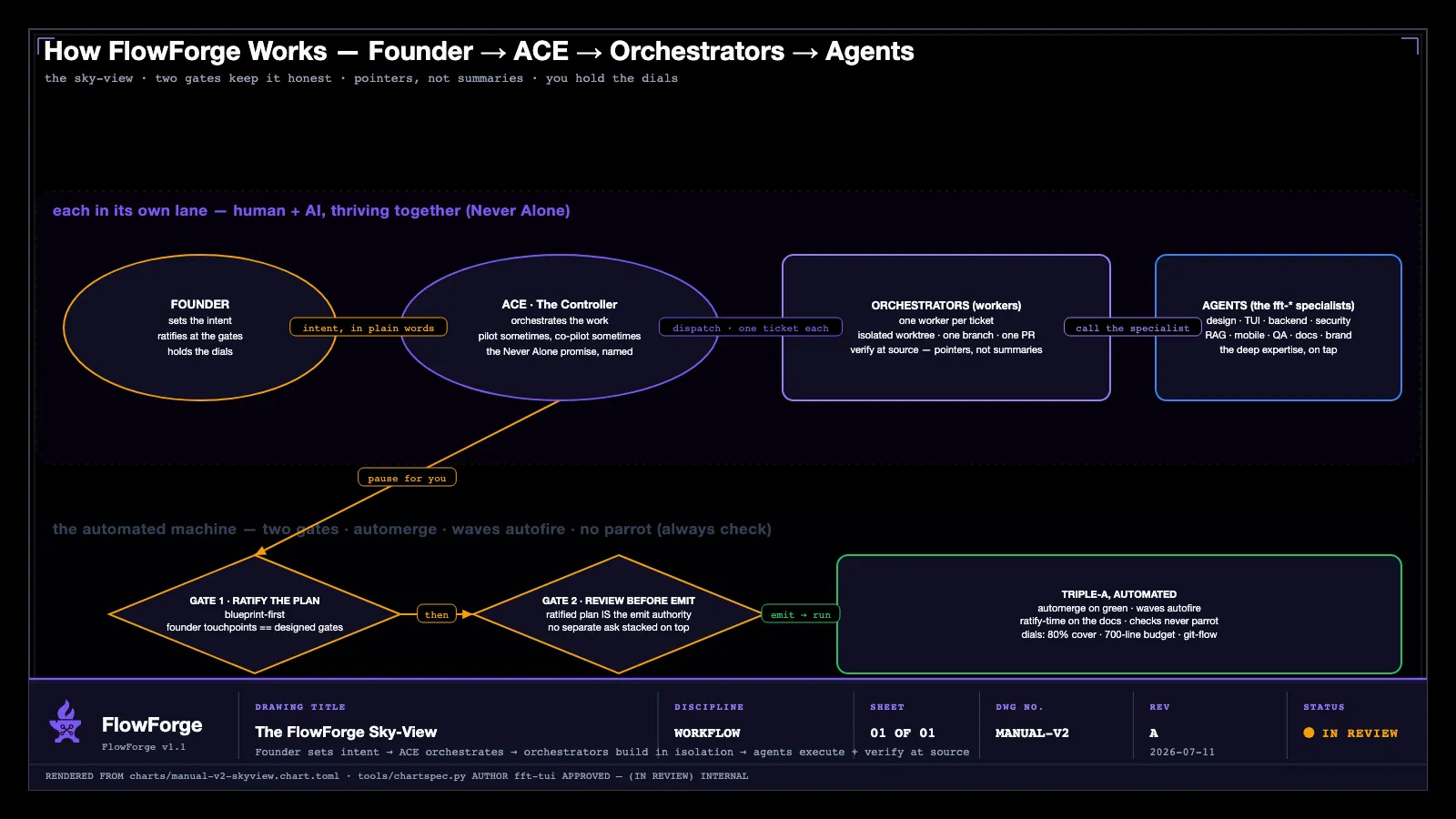
The sky-view: Founder → ACE → orchestrators → agents
The model is naive to describe and true in practice. Work flows down one chain of command and results flow back up it:
FOUNDER (you — sets intent, ratifies plans, merges what matters) │ ▼ ACE (The Controller — decides, dispatches, relays) │ ▼ ORCHESTRATORS (workers — one ticket each, isolated branch, draft PR) │ ▼ AGENTS (the specialist bench — depth on demand)- You set the intent and hold the two decisions that matter — is the plan right, and is the merge right.
- ACE — the controller, the personification of Never Alone — decides what to do directly and what to dispatch, then relays results back to you in plain terms.
- Orchestrators are workers: each carries one ticket in an isolated worktree, from branch to a reviewed draft pull request.
- Agents are the specialist bench (Chapter 10) — dispatched for the work they’re best at.
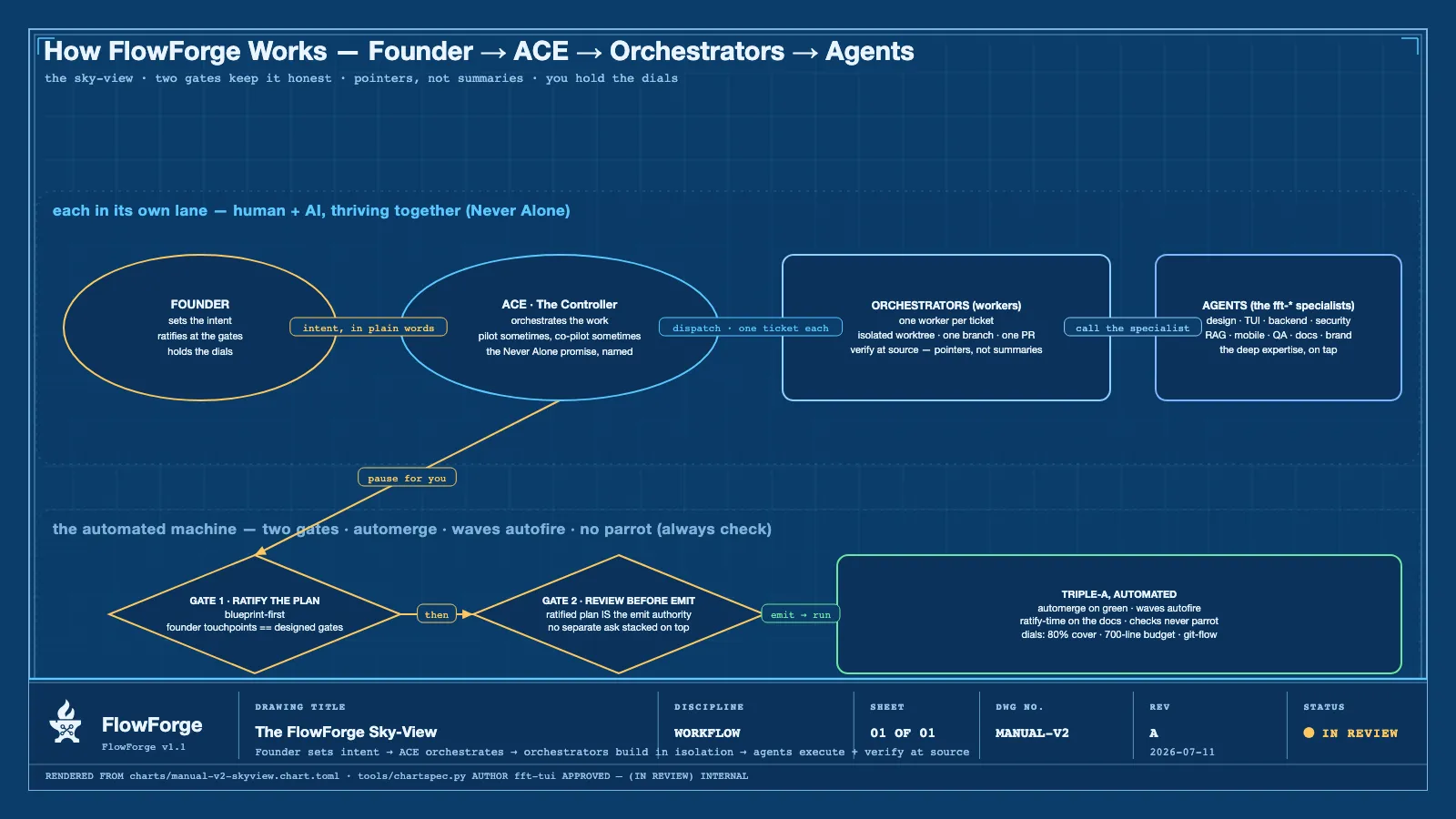
The same picture is drawn as a formal blueprint chart, rendered by the FlowForge chart generator in both themes — the brand-black and cyanotype engineering-drawing styles — so it belongs equally in the terminal, in a PDF, and on a wall:
The gates that keep it honest
Speed without gates is just a faster way to ship a bug. FlowForge’s automation is trustworthy because of the gates it can never skip:
- The review gate (GOLDEN). A worker never grades its own homework. An independent reviewer — a fresh, separate vehicle — reviews the pull request against the blueprint’s acceptance bar and posts the gating GOLDEN verdict. The worker that wrote the code cannot post the verdict that clears it.
- No merge on red. A failing CI check blocks the merge, always.
- The TDD gate. Core code changes must ship with their tests. The merge chokepoint structurally refuses a pull request whose core changes carry no test changes — this is enforced, not advised.
- The blueprint gate. Feature-sized work needs its blueprint artifacts — requirements, a product-owner brief, an architecture record — before code is dispatched. Trivial and bugfix work passes free; the gate is size-tiered so it never cries wolf.
Two founder touchpoints, and no more: you ratify the plan, and you (by default) do the final merge. Everything between is the machine’s job.
The AAA machine: automation you can trust
With the gates in place, FlowForge can safely automate the toil around them — the difference between a demo and triple-A software that ships itself:
- Waves autofire. A milestone’s tickets are emitted as a dependency-ordered wave; as each ticket’s dependencies clear, the next workers fire automatically. You don’t hand-launch every step.
- Automerge (opt-in). With the standing autonomy flag turned on, a fully-verified pull
request — open, mergeable, GOLDEN-at-head, and green — is merged hands-free, without waiting
for your keystroke. The flag waives only the final human
m; it can never bypass the GOLDEN or green-CI gates, which sit upstream and are structurally unreachable without passing. It is off by default — surfacing the merge for your go is the safe default until you decide otherwise. - Ratify-time on documentation. The blueprint discipline runs at plan time, so the docs exist before the code does — not as an afterthought.
- No parrot. The machine never repeats a claim it hasn’t checked. A reviewer’s severity grade is an input to judge, not a headline to echo; a worker’s “done” is a set of facts to verify, not a verdict to relay.
Automation and control aren’t in tension here — the gates are exactly what make the automation safe to trust.
The pointers doctrine
This is the discipline that keeps the machine from drifting into fiction. Orchestrators are never handed the answer — they are handed a pointer, and they verify at the source.
- A worker is told “the contract is in
ADR-0078” or “the API shape is in the swagger file” — not a paraphrase of what those say. - It reads the primary source and builds against that, so the implementation can’t drift from a summary that was subtly wrong.
- The reviewer does the same in reverse: it checks the work against the primary sources, not against the worker’s description of the work.
Never summaries, never assumptions. The blueprint is the source of truth; the code follows the blueprint, never the other way around.
htmlinsteadofmds
A blueprint written as a raw Markdown file is honest but ugly — and when a stakeholder ratifies
an .md, they’re approving something they can’t really see. FlowForge closes that gap.
Point the docs engine at any Markdown file and it renders, in a split second, a brand-styled HTML archetype — perfect in both dark and light — that you can put in front of a teammate, a client, or an investor:
flowforge docs render <file.md> --out <dir>One ugly source, one beautiful, presentable rendering — no restructuring, no hand-styling. This alone changes ratification: people approve what they can see.
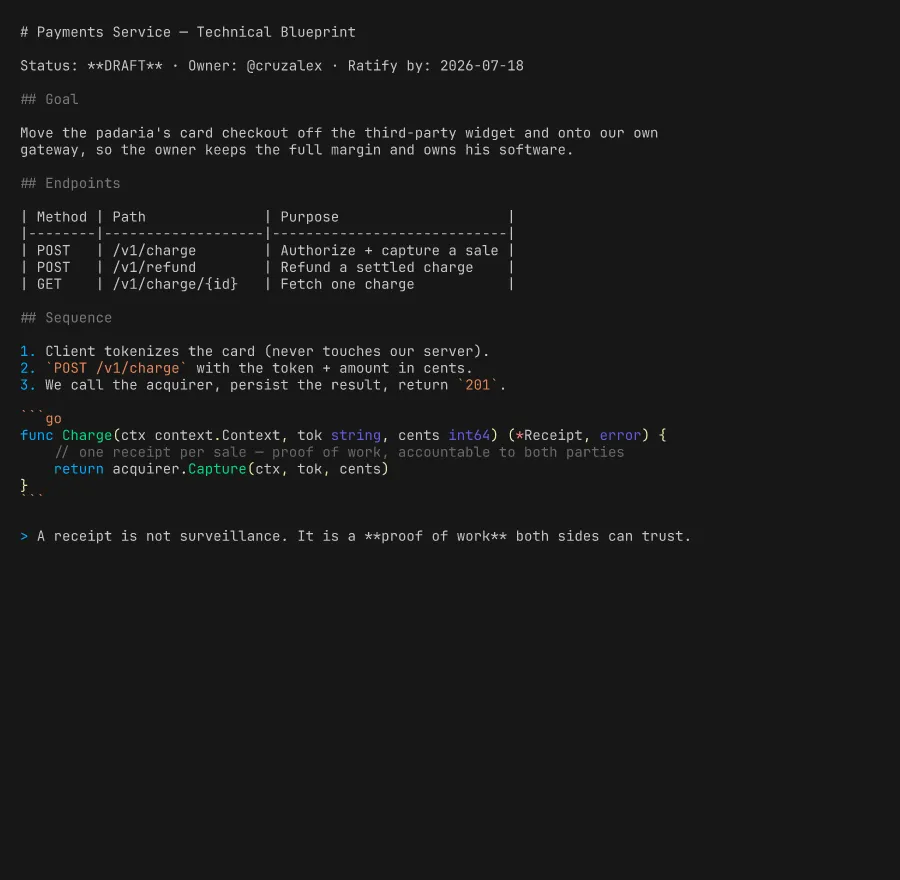
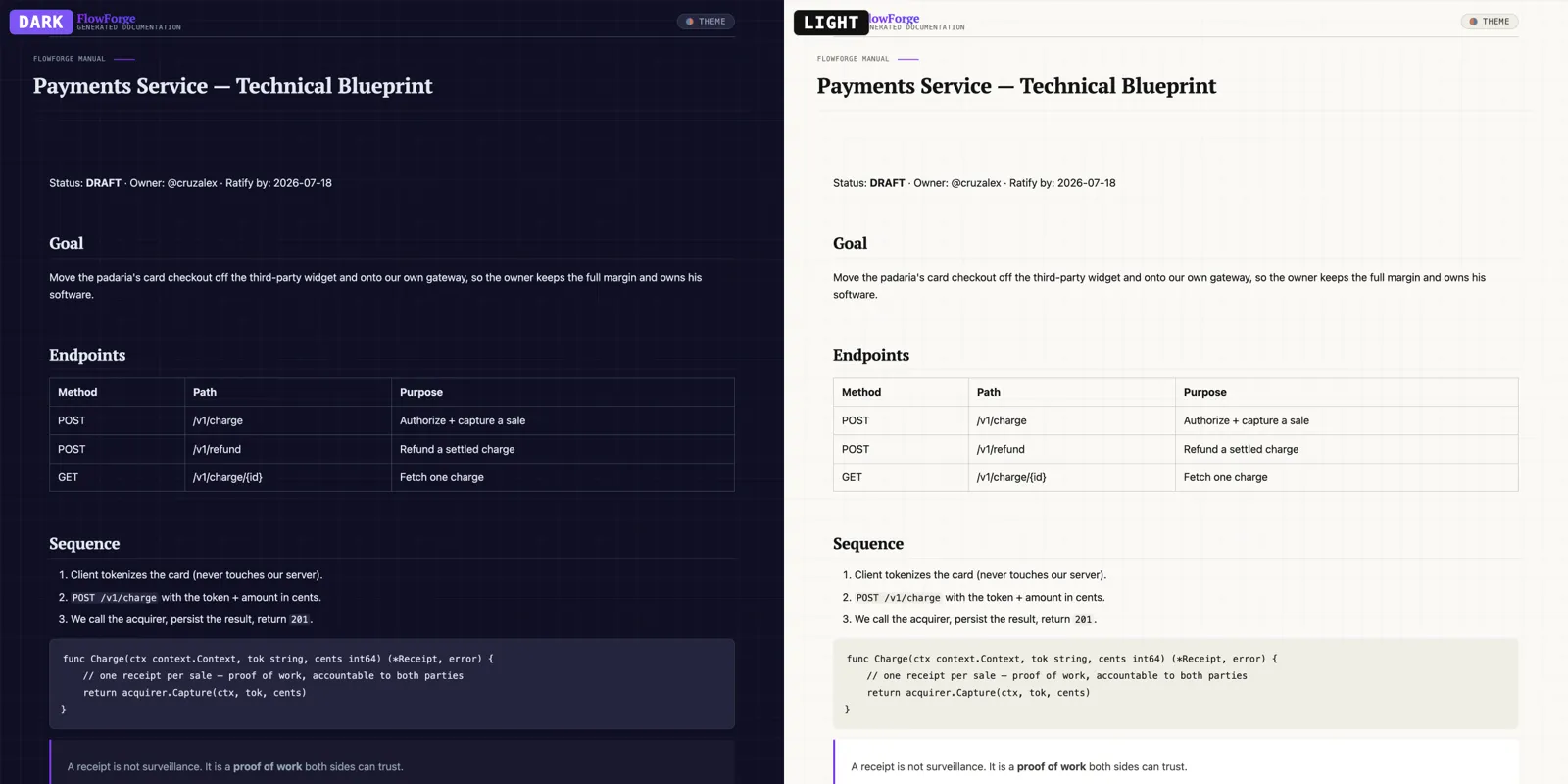
Inside the cockpit and the desktop app, these render straight into the preview pane and the Documents Drawer — you never have to leave FlowForge to read your own work.
The dials — recommended by science, decided by you
FlowForge ships with defaults drawn from experience and evidence — but they are dials, not
laws. Every one of these lives on the Settings screen (S in the cockpit, Chapter 9), and
you turn them:
| Dial | Default | What moving it does |
|---|---|---|
| Line budget per file | 700 | The commit hook blocks a file over budget. Raise it for more headroom, lower it for stricter reviewability. (Enforced at commit.) |
| TDD coverage target | 80% | The bar for how much of the change its tests must cover. Lower = faster spikes and a weaker safety net. |
| GOLDEN accepts MINOR | off (strict) | Whether the reviewer’s GOLDEN tolerates minor findings, or holds the line. |
| Doc strictness | normal | relaxed · normal · strict — how much documentation a change must carry. |
| Blueprint gate | warn | warn · hard — whether missing blueprints warn or hard-block a dispatch. |
| Auto-merge | off | Whether verified PRs merge hands-free (see the AAA machine, above). |
| Voice pause window | 2500 ms | How long ACE waits through a pause before ending your spoken turn. |
Alongside these sit the workflow choices FlowForge recommends — git-flow discipline
(feature branch always, never commit to main), deploy-from-main so main always equals the
customer’s code, and per-worker Quality Zone telemetry so you can see the health of the
work as it runs. Recommended defaults, every one of them yours to tune.
ForgePlays
A ForgePlay is a named, guided run of a whole ceremony — one command that walks a directed sequence of steps with the founder’s gates built in exactly where the plan needs them (Chapter 7). The signature play, Plan a Feature, turns a plain-language idea into properly-attached, properly-documented tickets with exactly two gates. Other plays land a legacy codebase or stand up a landing page. The plays don’t remove your judgment — they remove the toil around it.
Future vision — the plays still to come
The ForgePlay library is designed to grow. On the roadmap:
- A launch-campaign play — take a shipped feature all the way to its announcement.
- A paid-traffic specialist — a marketing agent that plans and tunes acquisition.
- Video-LLM reels — turn a release into short, shareable product videos, automatically.
The pattern is always the same: a ceremony worth repeating becomes a play you can press.
Where to go next
- The living catalog of specialists: flowforgesoft.com/agents
- The product, pricing, and the story: flowforgesoft.com
- Install it in one line:
curl -fsSL https://get.flowforgesoft.com/install.sh | sh
Why it matters
The machine is not magic and it is not a black box. It is a clear chain of command, a small set of gates that can never be skipped, and a large set of dials you control. That’s what lets FlowForge run fast and stay trustworthy at the same time — automated where it’s safe, gated where it counts, and always pointed at what you actually asked for.