|
|
SHEET 1/1 · REV v1.2.28 · DATE 2026-10 · DRAWN BY Alex
|
|
View online →
|
|
Continue to act thus, my dear Lucilius—set yourself free for your own sake; gather and save your time, which till lately has been forced from you, or filched away, or has merely slipped from your hands.
— Seneca, Moral Letters to Lucilius, 1.1 (tr. Richard M. Gummere)
|
|
FlowForge exists for your time. This release stops sending you to a terminal to ratify, closes finished work by itself, and connects a database in one press.
|
|
Hi,
This release stops doing three things to you. It no longer sends you to a terminal to ratify: every ratify door now finishes the job where you already are, on a screen, with a press of your own. It no longer leaves a finished sprint open: when the last ticket closes, the sprint and its epic close with it. And it no longer calls a busy fleet blocked and stuck when the workers are simply working.
The change I would show you first is smaller to describe than to feel. You can now connect a database, and allow the database assistant to read it, inside the product: three short steps and one press, with no terminal and no secret pasted into a chat. Two more things are worth your time. Waves is now a screen you can find, one key from the War Room. And the briefing module ships: before a play builds anything, it interviews you, drafts what it heard, and builds only on what you ratify.
Please try three things first: open a plan or study in the Documents drawer and choose Ratify… from its ⋯ menu, press Q on a War Room sprint to open Waves on it, and open Settings ▸ Databases in the cockpit to connect a database if you want the database assistant to read one. After you update, quit and relaunch every open cockpit and FlowForge Desktop. If anything breaks, or simply reads wrong, reply and tell me. I read every one.
All the best,
Alex
|
|
|
This release, in numbers
|
|
93 pull requests
merged.
|
|
199,763 lines added
— code 92,535 · tests 60,209 · docs 47,019.
|
|
Delivery mix
— feature 50% · bug 29% · docs 14%.
|
|
|
Three days of work, with 60,209 lines of tests beside the code. You are the first to run it.
|
|
|
Connect a database, in the product
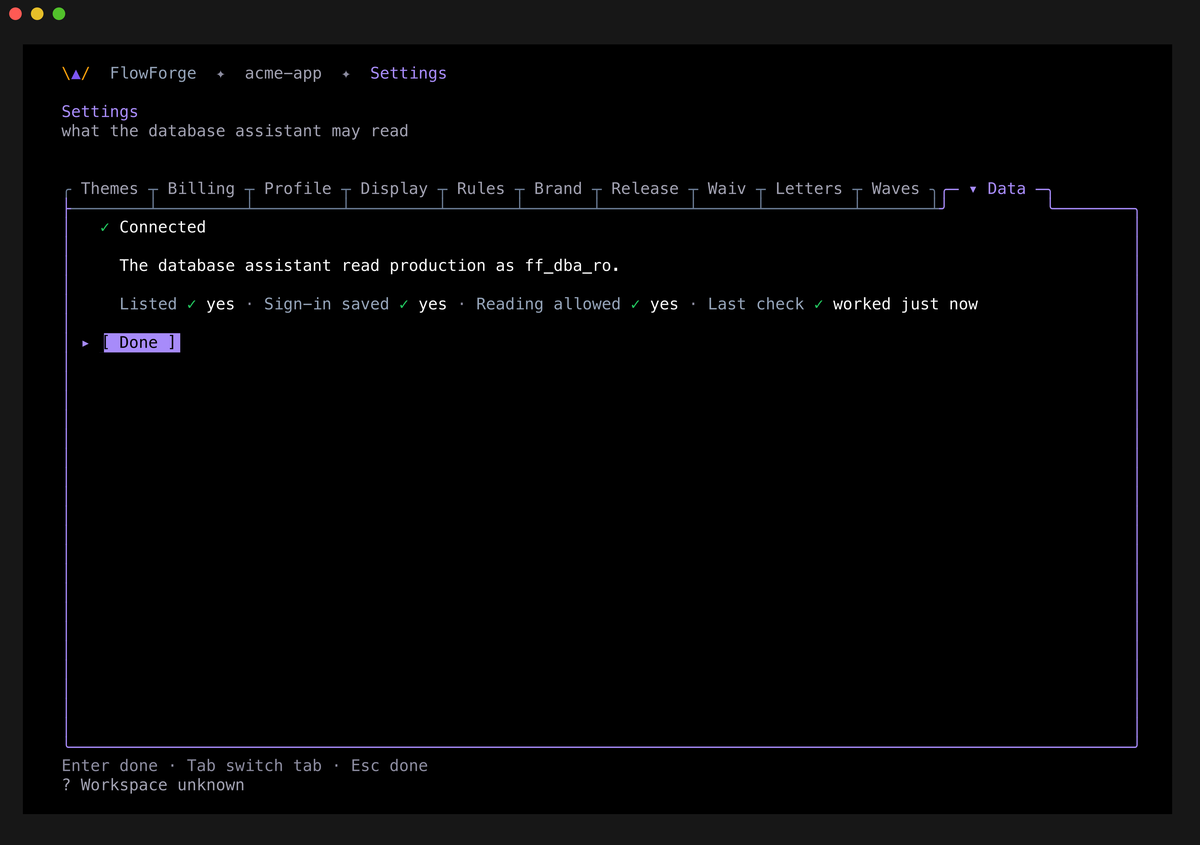
The cockpit has a new Settings tab, Databases. Each database shows four facts: Listed, Sign-in saved, Reading allowed and Last check. Connect a database takes three steps (where it is, the sign-in, review and allow) and then one press. The press saves the sign-in to your keychain and allows the database assistant to read the database. FlowForge builds the link itself, so a password holding @ : / ? # % just works.
Connected shows only after the assistant's first read has succeeded. The picture is that tab, shown as Data, which is what it reads when the tab strip is short. It belongs to a project named acme-app, and all four facts are green.
|
|
|
|
|
52 specialists, three re-cut
|
|
The roster stays at 52. Three specialists changed, and one new skill arrived.
fft-requirements-analyst (1.0.0 → 1.1.0) gains three modes for the briefing module: interview rounds, a cited draft, and an opt-in cold review. It asks at most seven questions per round, and never tells you how many questions or rounds remain.
fft-content-strategist (2.0.0 → 2.1.0) writes the document and deck you show a team or an investor, using the new flowforge-layperson-copy skill: plain words, no identifiers in the body, every word traced to the brief.
fft-release-engineer now requires every release letter to carry a picture of what shipped, name every agent in this block, and open with a sourced quote. A letter sent with its pictures blanked is now a regression it stops on. You are reading a letter written to that rule.
The new skill flowforge-dba-onboarding is carried by fft-database-architect, and it teaches that connecting a database is one act in the product, Settings ▸ Databases.
fft-dba carries the same skill, which teaches that connecting a database and allowing the database assistant is never a terminal command or a secret pasted in chat.
|
|
|
|
Ratify where you are
|
|
Every ratify door now completes the ratification where you are. In FlowForge Desktop, a brief's documents get the gate band, and Ratify unlocks once you have opened the presentation document at that revision. In the cockpit, a merge held by a ratification opens a decision pop-up where Ratify records your yes and the merge goes ahead. A ratification you give ACE in chat waits on the rail's Ratified in chat row, and ctrl+n confirms it. A plan or a study waiting on you now has a door too: every drawer row has a ⋯ menu with Open and Ratify…. No door completes on an agent's word alone. Each one needs a person's act on a screen.
|
|
|
|
Sprints and epics close themselves
|
|
A sprint and its epic now close when their last ticket closes, even outside a merge. Before this, a sprint could sit "active" at 12 of 12 done until someone closed it by hand. flowforge ticket close <N> closes a ticket and every container it finishes, in one action. A ticket closed with gh issue close or on GitHub's website is caught by the FlowForge daemon's sweep, every 15 minutes per registered project. A container you reopened by hand stays open, and a container with no children never closes.
|
|
|
|
Waves you can find, and a fleet that reads true
|
|
Waves is the first screen whenever anything exists, the empty one included, and Q on a War Room sprint opens it on that sprint. Adding a sprint is Q then ↵, or a from any row, and the queue shows each entry's place in line and the width as at once 2/4. Settings gains a Waves tab for how many run at once. Over in the Workers pane, a worker waiting on its own background agents reads working · 2 agents, not blocked · with ACE, and two live runs read as two waves.
|
|
|
|
The briefing module
|
|
Before a play builds anything, the requirements analyst interviews you in rounds of at most seven questions. You can answer, accept a suggestion, or say "I don't know yet". It drafts what it heard, you ratify it, and the play builds only on the brief you ratified, at the revision you read. Your ratification is stored in FlowForge's audit history with your own words. Plan a Feature, Landing Page, Legacy Analysis, Go-to-Market and the launch-product play all open with the brief, and it cannot be skipped. The flowforge brief verbs drive it, and the cockpit gives the interview its own surface.
|
|
|
|
Colado
|
|
Colado is a jiu-jitsu term for a position with no gaps: justo, perfectly adjusted, full pressure. It's the name we gave the FlowForge gates that leave no space between the rule and your work. This release closes four more. A ratification can no longer complete on an agent's word alone. A database grant can no longer be recorded without one confirmed press, and a connection link can no longer switch the login or the host through its options. A finished sprint can no longer stay open because its last ticket closed outside a merge. And a release letter can no longer go out with its pictures blanked.
|
|
|
|
Small things that change everything
|
|
Esc and ⌘F no longer close FlowForge Desktop. Type /refresh or /handoff alone on the composer line, or press F6 or F7 mid-draft, to refresh ACE or hand off while you type. A merge is no longer held for a person because a finished worker's folder was still being deleted. Panels stop going blank with "could not infer owner/repo" while GitHub still has calls left. And the banner of steps that wait on you shows one row per ticket, in plain words with one action.
|
|
|
|
One setup step
|
|
Quit and relaunch every open cockpit and FlowForge Desktop after you update, so the new ratify doors, Waves screens, Workers readings and the Databases tab are the ones running. Optional: connect a database at Settings ▸ Databases in the cockpit if you want the database assistant to read it.
|
|
|
|
Not yet
|
|
FlowForge Desktop's Databases section only reads. It has no sign-in field, so the sign-in and the press happen in the cockpit, and the desktop shows the result. A refused database read does not yet take you to Settings ▸ Databases by itself, and the Connected screen does not show what the first read found. A worker left idle for more than 30 minutes can still make ACE's recap read its workers as UNKNOWN; changing that is a policy decision, left out of this release on purpose. And the one-yes cut is part-built: the one-pass dry run ships, and other items on the same ticket are still owed.
|
|
|
HOW THIS LETTER REACHES YOU
|
|
How this letter reaches you
|
|
This letter comes out of FlowForge's own release pack: the same tooling keeps the release notes, the release page and this letter derived from one committed source. The same pipeline, which renders, exports to .eml and sends at promote, is in your own Settings. It is opt-in and off by default. Since v1.2.27's letter went out without its images, every letter must carry its pictures, name its agents and open with a sourced quote.
|
|

Made with FlowForge — 93 PRs · 199,763 lines · 3 days.
Alex — FlowForge · alex@flowforgesoft.com
2810 N Church St STE 88527, Wilmington, DE 19802
FlowForgeSoft, LLC
You are receiving this because you have a FlowForge account and opted in to release letters.
FlowForge never asks for your password, token or card details by email.
Update: flowforge update → see how
|
FlowForge · v1.2.28 · sheet 1/1
|
|
|