|
|
SHEET 1/1 · REV v1.2.29 · DATE 2026-10 · DRAWN BY Alex
|
|
View online →
|
|
The process is mutual; for men learn while they teach.
— Seneca, Moral Letters to Lucilius, 7.8 (tr. Richard M. Gummere)
|
|
This release started from the record of one night spent trying to use Waves on 1.2.28, and fixes the places where that record shows it lost the way. From this letter on, every letter also teaches two of our agents and one thing FlowForge already does.
|
|
Hi,
On 1.2.28, starting a sprint as waves was on no screen, a second start was refused without a word, back threw you out of Waves, and the waves widget grew with every run. This release is about one thing: you can now start a sprint as waves, queue one, or run a second beside the first, from the War Room, from Waves, or by telling ACE, with no terminal.
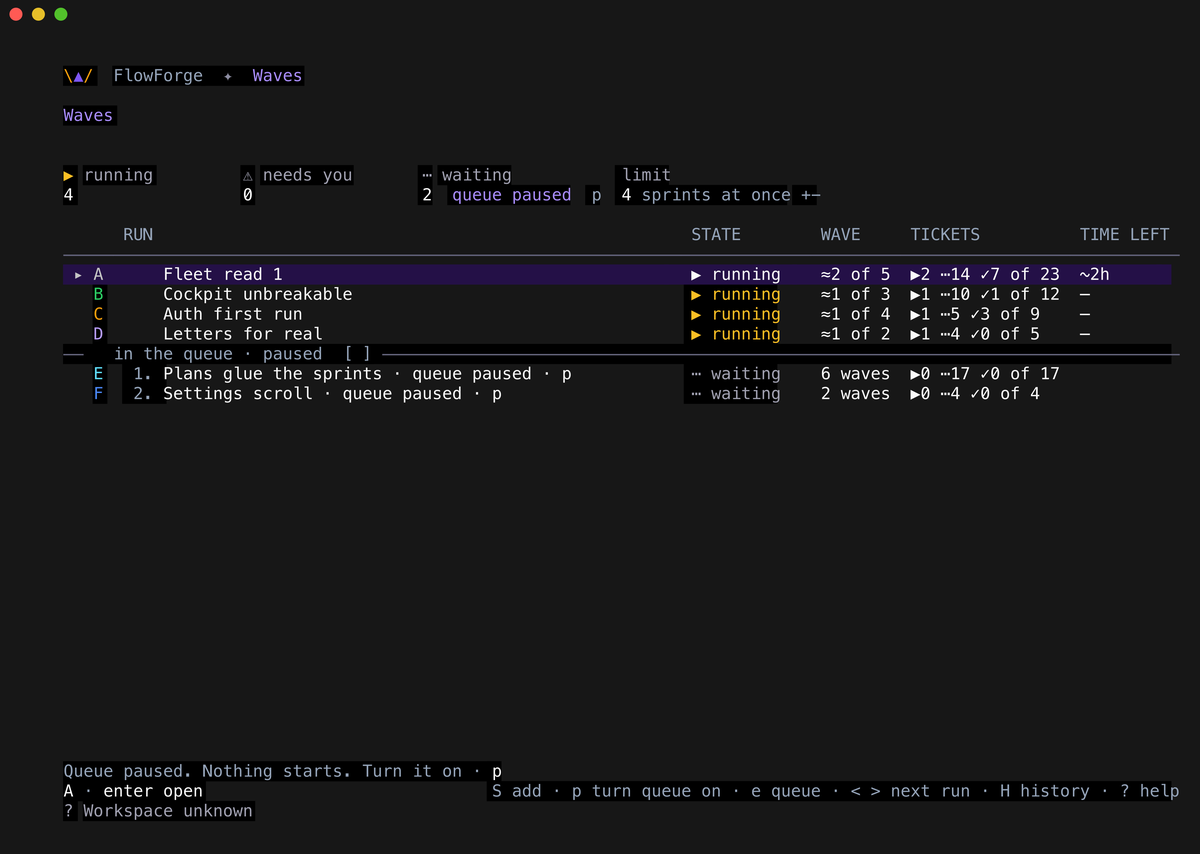
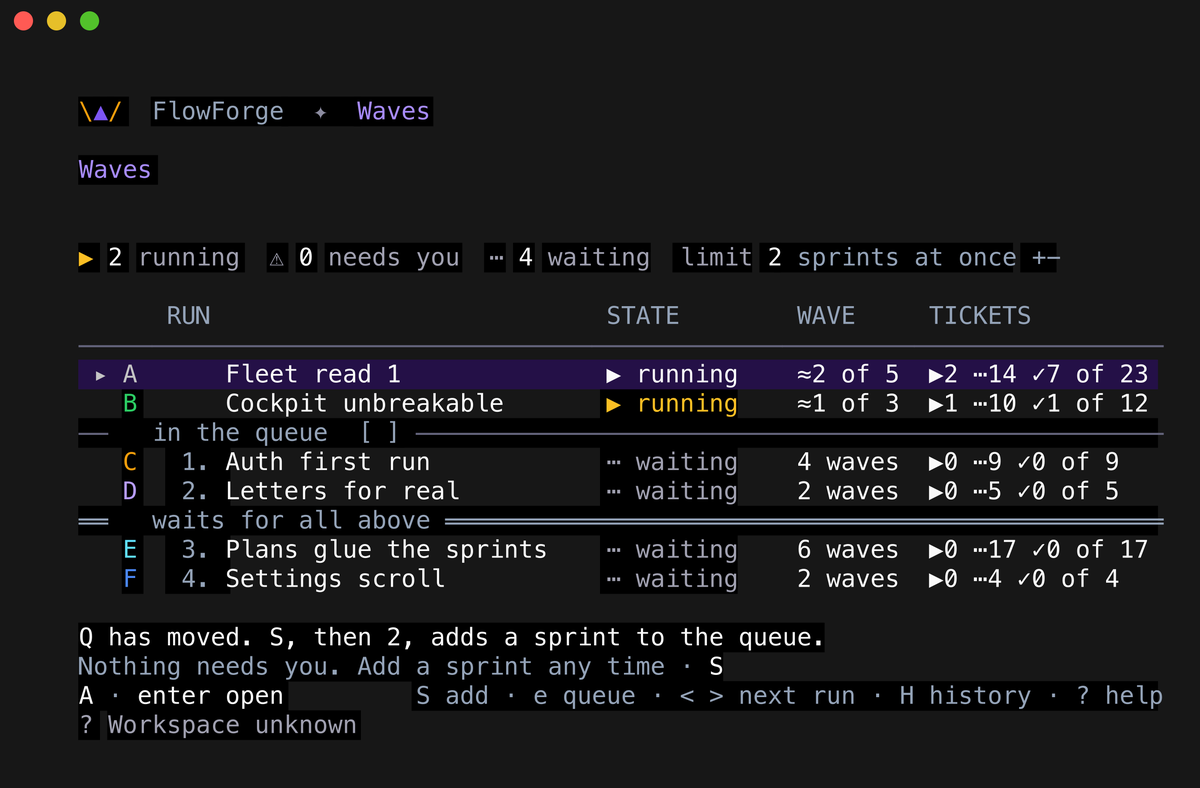
What I would show you first is the widget. Each run's row now says how many tickets are working, waiting and merged, and which wave it is on. It keeps one height, and when there are more runs than rows it turns its page instead of growing. A run that needs you is on every page.
Please try three things: press S on a War Room sprint and then enter, press p on Waves to pause and restart the queue, and press < or > on the cockpit home to pick the run the waves line shows. Some keys moved. On Waves, Q, R and a pressed from habit change nothing and tell you their new key; on the War Room, the behind / ahead filter moved from S to B. After you update, quit and relaunch every open cockpit and FlowForge Desktop. Before you start, read Not yet at the end of this letter: the last check of this release found one thing we are still fixing. If anything breaks, or simply reads wrong, reply and tell me. I read every one.
All the best,
Alex
|
|
|
This release, in numbers
|
|
95 pull requests
merged.
|
|
411,932 lines added
— code 43,842 · tests 88,694 · docs 279,396.
|
|
Delivery mix
— bug 44% · feature 29% · docs 17% (the three largest).
|
|
|
Merged in three days, with more than twice as many lines of tests as of code. You are the first to run it.
|
|

|
Start, queue and run sprints side by side
Each run is a row, in the same words and symbols for one run or many: its wave, then its tickets working, waiting and merged. With five runs live and four rows, the main line reads 5 runs · 3 working · page 1 of 2, and the page turns by itself. A run that needs you is pinned to every page, so what needs you stays on screen.
|
|
|
|
|
52 specialists, one changed, and a new skill for ACE
|
|
|
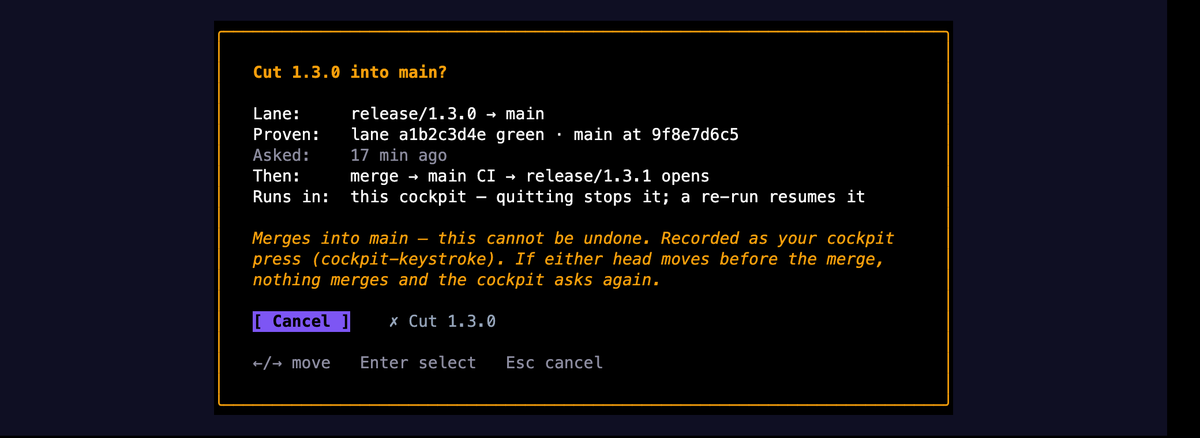
fft-release-engineer now runs a release so that you give one yes, and give it last. It proves the release lane green before it asks you anything, then relays the request for you to answer with F in the cockpit, the desktop app's band, or a terminal. A cut that merged and then stopped resumes with no new yes, and every flaky test it meets is filed as a bug.
ACE has a new skill, flowforge-waves. Ask it to start or queue a sprint, move one, raise the limit, resume a stuck run, or stop or pause a run you name, and it does it through the same door the cockpit uses, tells you what happened in the product's own words, and names the key that does the same on Waves, so you learn the screen as you go. Before it stops a run, it asks you first. It never hands you a command to type.
|
|
|
|
Two legal agents: plan first, draft second
|
|
Two agents split the legal side of a software deal: one decides what the deal needs, the other drafts it under one country's law.
|
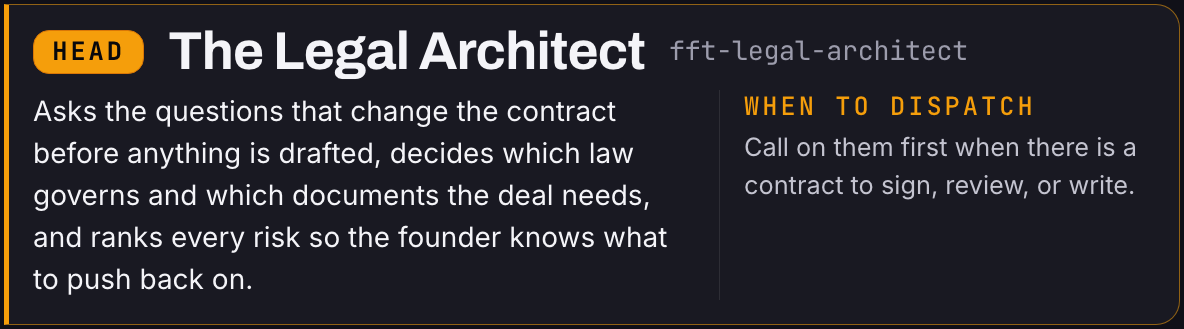
fft-legal-architect
|
|
|
|
fft-legal-architect plans the legal side of a deal before anything is written. It asks what changes a contract (who signs, who the customer is, where the data lives), picks the documents and governing law, and ranks each risk high, medium or low.
|
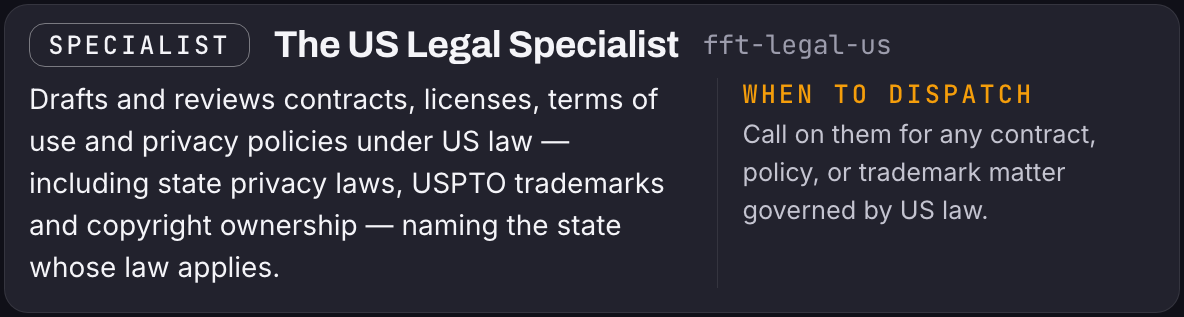
fft-legal-us
|
|
|
|
fft-legal-us takes that plan and drafts or reviews documents under United States law, naming the state whose law applies. Its work comes back as an issue list with proposed wording.
|
|
What changes:
|
|
• Contractor code. Before: a "work for hire" clause that feels safe. After: fft-legal-us follows its rule for contractor code (never rely on "work for hire" alone) and adds a written assignment.
• California users. Before: a privacy policy copied from a template. After: fft-legal-us asks where your users are and what you collect, checks whether California's privacy law applies, and drafts the policy to match your product.
• A US customer's contract. Before: signed as it arrived. After: fft-legal-architect sets where to push and where to walk away; fft-legal-us grades it clause by clause and proposes wording and a fallback.
|
|
Ask ACE, or name fft-legal-architect to plan a deal and fft-legal-us for one US document. Not legal advice: neither agent is a lawyer; an attorney admitted in the relevant state must review before anything is signed or filed.
|
|
|
|
Start a sprint from the War Room, in two presses
|
|
|
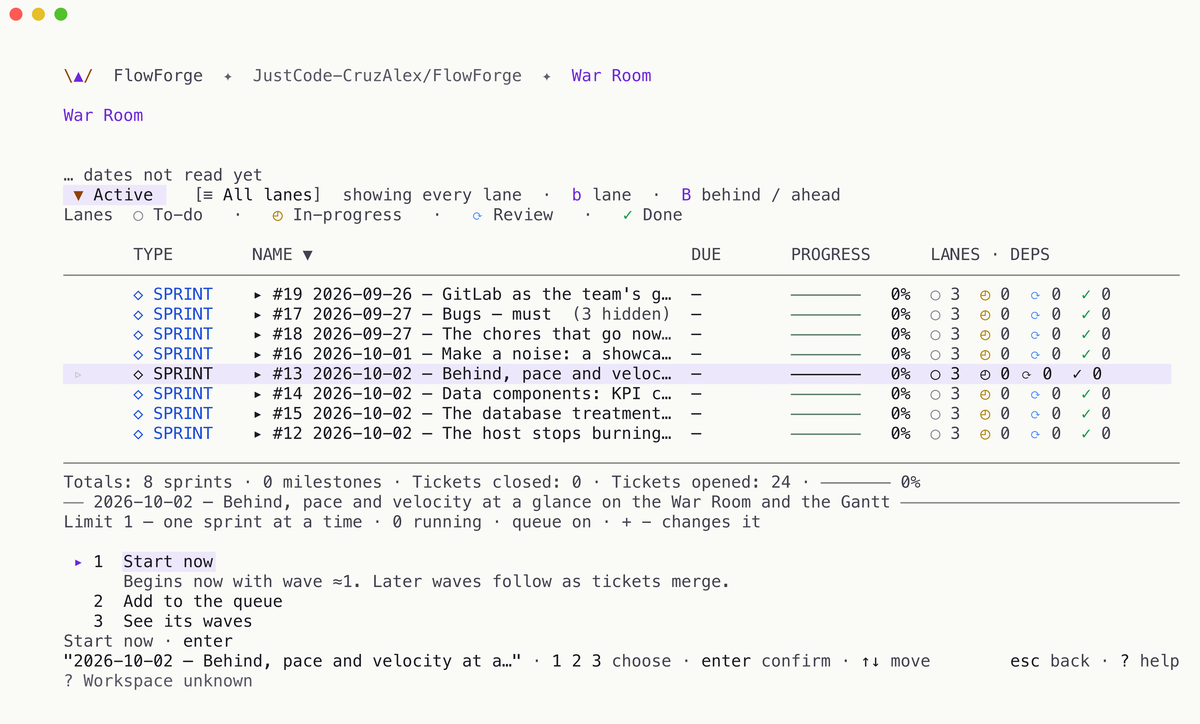
On any War Room sprint, S opens one choice over the list: start it now, add it to the queue, or see its waves. S then enter starts it, and you stay on the same row. The choice says the limit once and what each option will do, and with the limit full it offers the queue, or raising the limit and starting.
|
|
|
|
The queue starts what waits, and you steer it
|
|
|
What is queued now starts by itself, in its turn. p on Waves pauses the queue or lets it run, and the band, the queue's divider and every waiting row say which. On a stuck run, S offers to resume it, or to skip the ticket it stopped on after a confirm that names it. Every Waves screen keeps its next step on one line above the footer.
|
|
|
|
On Waves, a key that moved tells you where it went
|
|
|
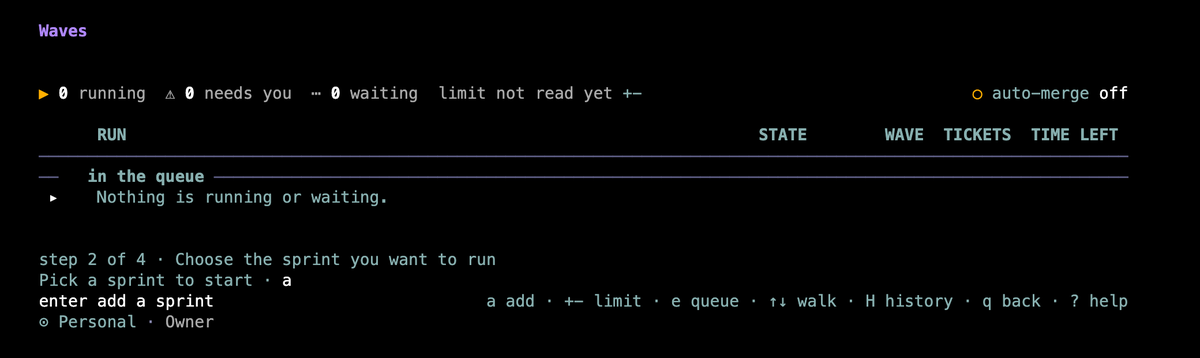
Back now goes back one level, and only the Waves overview leaves Waves. On Waves, S adds a sprint: S then 1 starts it beside the others, S then 2 queues it. Press Q, R or a there from habit and nothing happens except one line naming the new key. ? lists everything that moved under Moved in 1.2.29.
|
|
|
|
Press H to see every finished wave
|
|
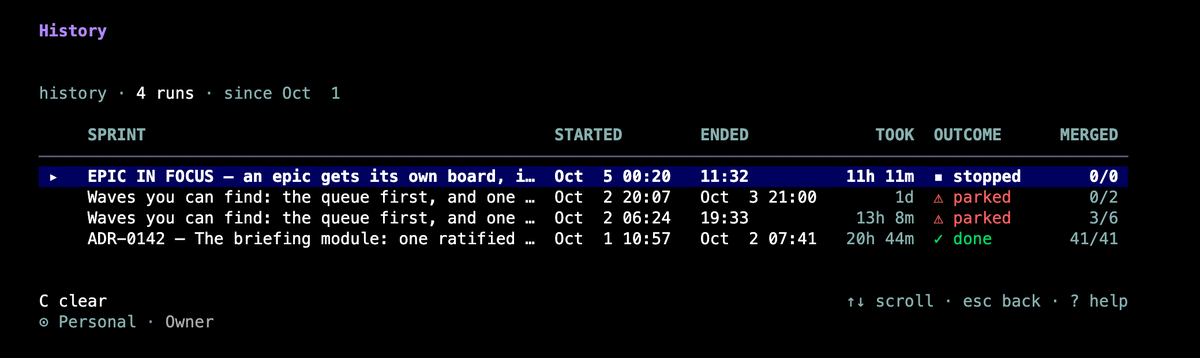
Press H on the Waves screen to open the wave history: every run that ended, newest first. Each row shows the sprint, when it started and ended, how long it took, how it ended (done, stopped, parked and more) and tickets merged out of tickets fired.
|
|
|
|
You can see what a wave really did after it ended. In ours, the briefing-module sprint reads done, 41 of 41 merged. Another was parked twice: 3 of 6 merged, then 0 of 2. esc goes back to Waves. To wipe the history, press C, then C again; any other key keeps it.
|
|
|
|
Two limits. The history lives on the machine you ran on, so another computer will not show it. A row cannot be opened for per-ticket detail.
|
|
|
|
Not yet
|

|
|
The widget turns its page every 30 seconds for now, and that time is provisional.
The last check of this release, run on the built binary, found one thing we are still fixing: with 6 or more runs at once, later runs can wait for a slot, and a run started from the command line may not begin (#7916, fixed in 1.2.30).
|
|
|
HOW THIS LETTER REACHES YOU
|
|
How this letter reaches you
|
|
This letter comes out of FlowForge's own release pack: the same tooling keeps the release notes, the release page and this letter derived from one committed source. The same pipeline, which renders, exports to .eml and sends at promote, is in your own Settings. It is opt-in and off by default. From this release on, the cut refuses a letter that does not teach two connected agents and one feature, or that has an item without a picture of it.
|
|

Made with FlowForge — 95 PRs · 411,932 lines · 3 days.
Alex — FlowForge · alex@flowforgesoft.com
2810 N Church St STE 88527, Wilmington, DE 19802
FlowForgeSoft, LLC
You are receiving this because you have a FlowForge account and opted in to release letters.
FlowForge never asks for your password, token or card details by email.
Update: flowforge update → see how
|
FlowForge · v1.2.29 · sheet 1/1
|
|
|