
The Automated Workflow
If The Process is how one feature travels from an idea to a closed ticket, this is the repeating engine that drains a whole sprint or milestone around it. FlowForge’s founder calls it the moat:
“Our real moat is: create a feature (generate all the documentation, blueprints, milestone/sprint and tickets) → kanban → see it in waves → auto-fire → auto-merge → iterate until the end of the sprint/milestone. As auto-merge works perfectly, we have a real automated workflow.”
Every node below maps to a real command, package, or rule in FlowForge — the chart is a mirror of what the tool actually does today.
The loop at a glance
Section titled “The loop at a glance”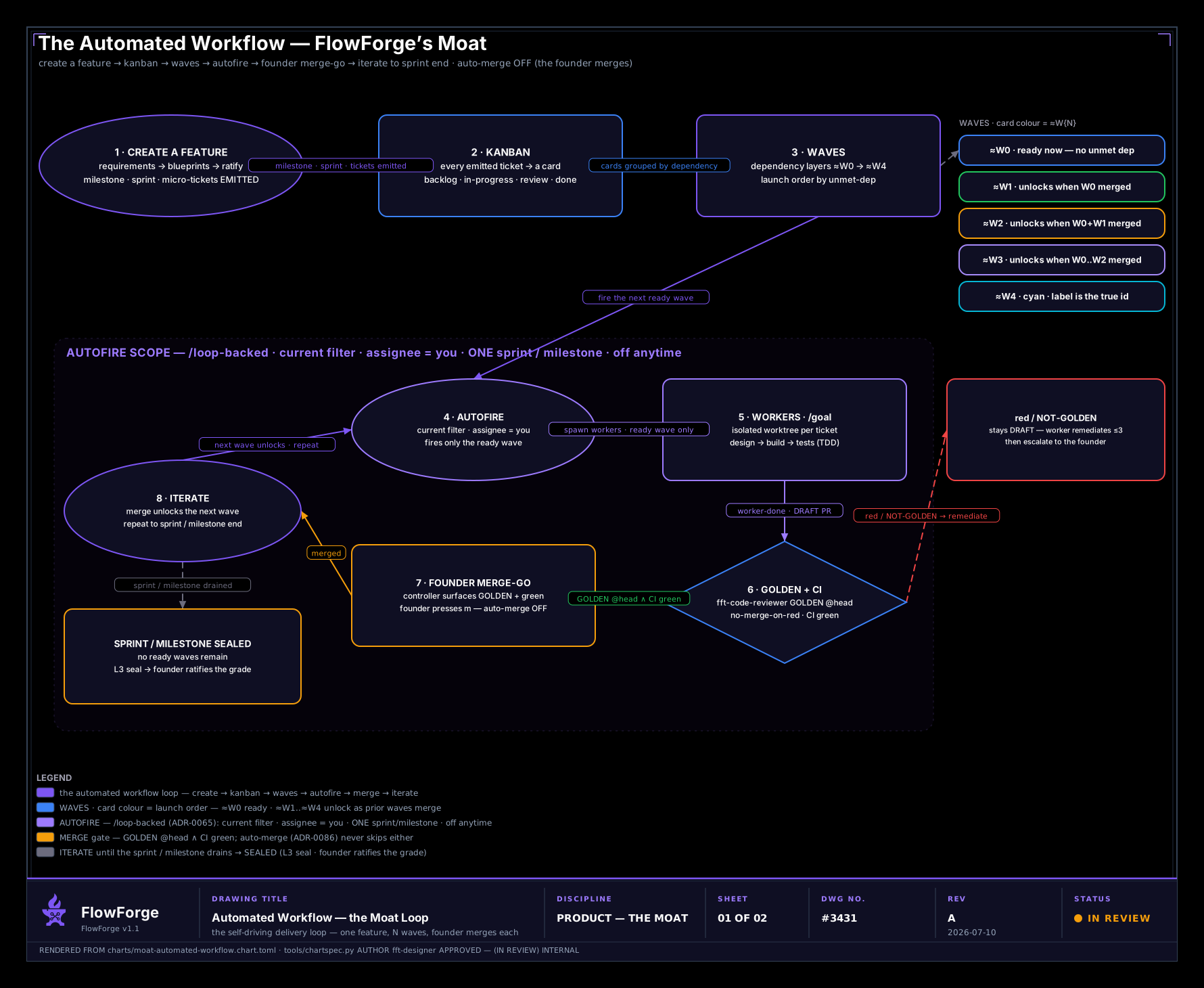
Edit this diagram in Excalidraw — the editable source for this chart.
This is the default — auto-merge OFF, the founder performs each merge. There is one opt-in variant, shown below, where a standing consent flag lets each merge fire hands-free once the same gates clear.
Node by node
Section titled “Node by node”1. Create a feature
Section titled “1. Create a feature”One feature goes from intent to a ratified blueprint, and from that blueprint the milestone, sprint, and its micro-tickets are emitted — documentation, milestone, and tickets in one guided pass. Nothing is hand-typed: the tickets are derived from the ratified feature record through the EMIT ⟺ RATIFIED chokepoint (a direct gh issue create for implementation work is denied). The full requirements → blueprint → emit spine is The Process, nodes 1–5.
2. Kanban
Section titled “2. Kanban”Every emitted ticket becomes a card — backlog · in-progress · review · done. This is where you see the whole feature at once.
3. Waves
Section titled “3. Waves”The cards are grouped into dependency layers, ≈1 → ≈5, so you see launch order rather than a flat list. A card’s colour is its wave:
| Wave | Colour | Unlocks |
|---|---|---|
≈1 | blue | ready now — no unmet dependency |
≈2 | green | when all of ≈1 is merged |
≈3 | amber | when ≈1 + ≈2 are merged |
≈4 | purple | when ≈1..≈3 are merged |
≈5 | cyan | colours repeat past ≈5 — the ≈N label is the true id |
Colour never carries a wave alone — the ≈N label rides with it (waves count from 1; W is for workers only), so the board reads under colour-vision deficiency and with NO_COLOR.
4. Autofire
Section titled “4. Autofire”Autofire fires the current ready wave and keeps the merge pipeline self-driving on every tick. It is deliberately scoped and interruptible — this is the honest heart of the loop:
- current filter · assignee = you — it acts on the board you are looking at, for your tickets, not the whole repo.
- one sprint / milestone at a time — it advances a single milestone’s waves; it never fans across milestones.
- fires only the ready wave — a wave with unmet dependencies is parked, never launched early.
- off at any time — it is a toggle, not a runaway.
/loop-backed — it runs on the/loop-as-runtime substrate: bounded iterations, a no-progress breaker, and a spawn/spend ceiling.
5. Workers
Section titled “5. Workers”Each fired ticket runs as an isolated-worktree worker on its own branch, launched in permission-mode auto. The worker sequences the specialists — design → build → tests (TDD on code that matters) — reaches its /goal, and opens a draft pull request.
6. GOLDEN + CI
Section titled “6. GOLDEN + CI”Two independent gates must both clear before a merge is possible:
- GOLDEN @head —
fft-code-revieweris the sole GOLDEN arbiter, dispatched isolated and out-of-process at head. - No-merge-on-red — required CI checks must be green; a live pre-merge hook enforces it at the merge chokepoint.
Work that is not GOLDEN, or red, stays DRAFT — the worker remediates on its /goal (up to three rounds), then escalates to you. Auto-merge never routes around this.
7. Merge
Section titled “7. Merge”The founder merges (this default sheet). The controller surfaces the GOLDEN, green, READY pull request and you press m. When the standing consent flag is on, this step changes — see the auto-merge-ON variant below.
8. Iterate — until the sprint drains
Section titled “8. Iterate — until the sprint drains”A merge unlocks the next wave (≈1 merged ⟹ ≈2 ready, and so on). Autofire fires it, and the loop repeats — autofire → workers → GOLDEN + CI → merge → iterate — until no ready waves remain. Then the milestone is sealed: the seal computes the grade and you ratify it, gap by gap (the seal surfaces each gap, it never rewrites the blueprint).
The same loop, with auto-merge ON
Section titled “The same loop, with auto-merge ON”The chart at the top is the default: auto-merge OFF, the founder performs each merge (node 7). FlowForge also ships an opt-in capability — the merge-autonomy standing-consent flag — that lets each merge fire hands-free. Here is the same loop with that flag on:
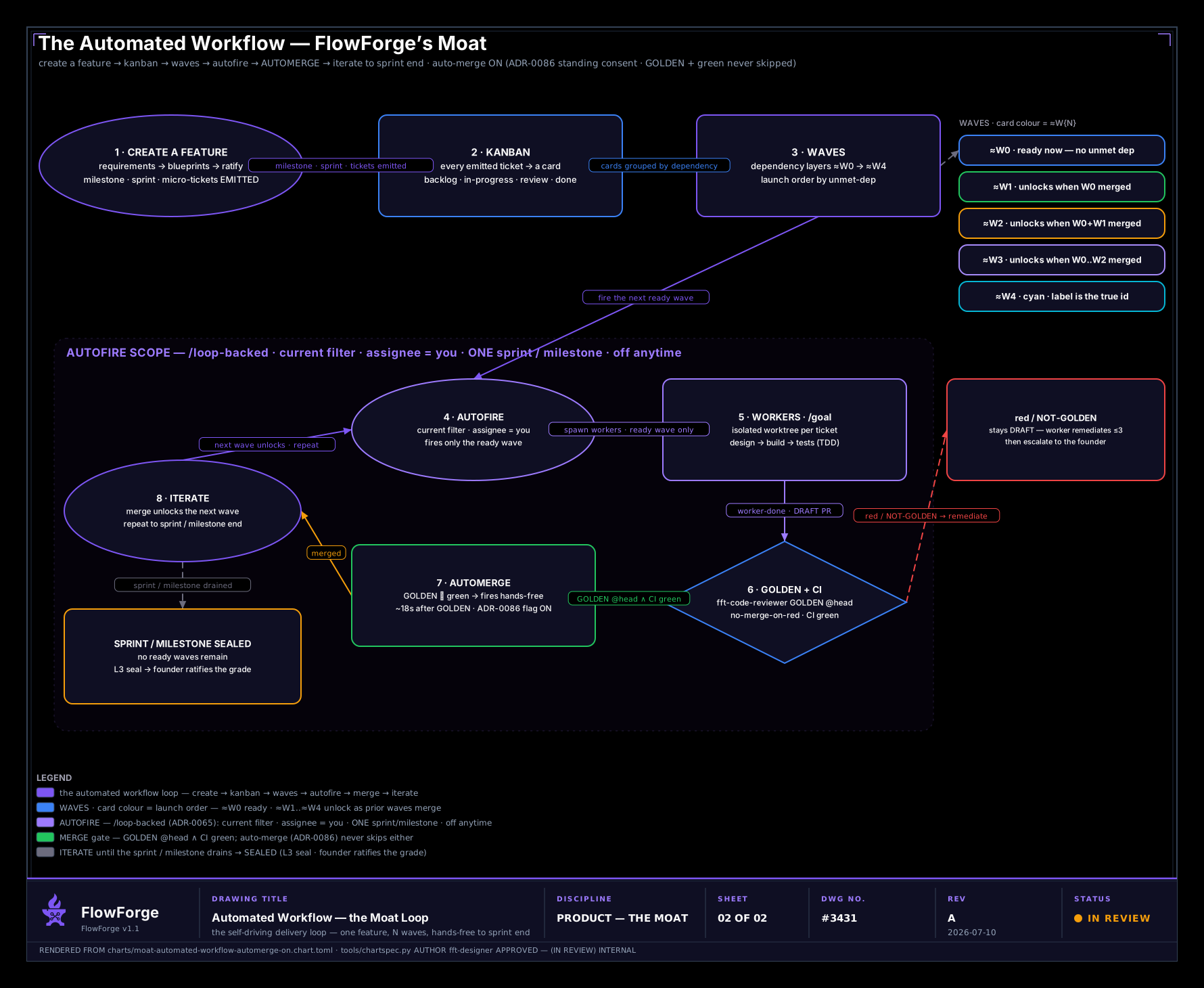
Edit this diagram in Excalidraw — the editable source for the auto-merge-ON variant.
What changes, and what does not:
- What changes — node 7 is no longer a founder click. With the flag on, once GOLDEN and green CI both hold, the merge fires hands-free (about eighteen seconds after GOLDEN). Founder touchpoints reduce to the two upstream ratify gates (the plan and the blueprint).
- What does not change — the flag is consent to merge, never permission to skip the gates. GOLDEN and green CI are still required. Auto-merge only removes the manual merge click; it never merges un-reviewed or red work. The flag is off by default and turning it on is a deliberate, recorded choice.
This is why the two sheets share one spine and one legend: the discipline is identical; only the last human touch is automated away, and only after the same gates have cleared.
The node-by-node source anchoring lives in the repository at documentation/2.0/architecture/3431-automated-workflow-model.md. Both sheets render in the FlowForge brand theme (brand-black and cyanotype) via the #1749 chart generator; this chart is a companion to The Process.