The Process
This is the canonical FlowForge delivery flow: how a feature travels from an idea you state to ACE, through its blueprint, into isolated worker dispatch, past review and CI, and finally to a merged, closed ticket. Every node below maps to a real skill, rule, or command in FlowForge — the process is a mirror of what the tool actually does today.
The flow at a glance
Section titled “The flow at a glance”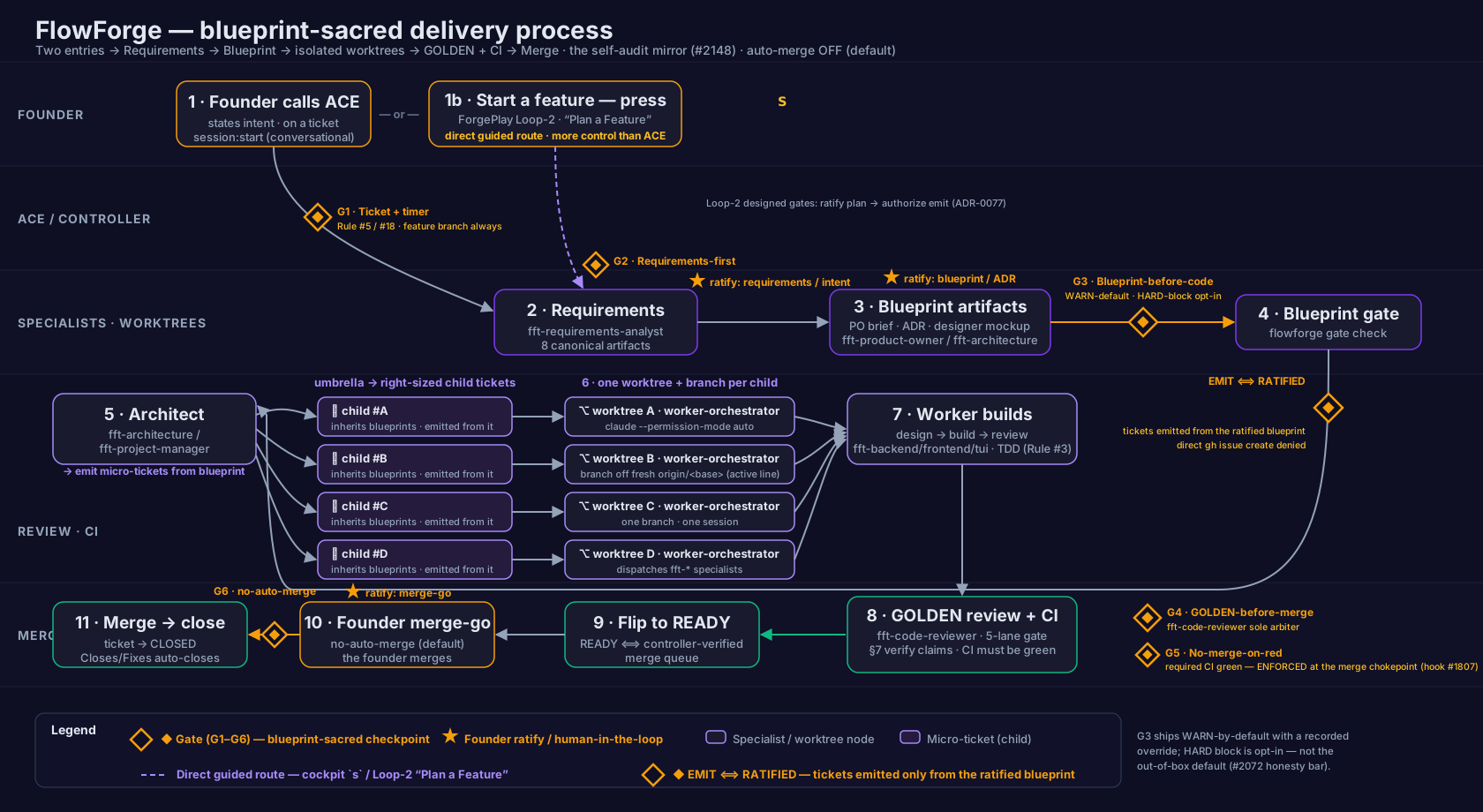
Edit this diagram in Excalidraw — the editable source for this chart.
This is the default — auto-merge OFF, the founder performs the merge. There is one opt-in variant, shown below, where a standing consent flag lets the merge fire hands-free once the same gates clear.
Two entry points
Section titled “Two entry points”Every run starts one of two ways, and both feed the same requirements → blueprint spine:
- Founder calls ACE (node 1) — you open a controller session and state your intent conversationally.
- Start a feature — press
s(node 1b) — the cockpitskey opens the guided Start-a-feature / Loop-2 “Plan a Feature” route (openLoop2, ADR-0077 D-7), which lands on the ForgePlayplan-a-featureexplain-screen. It is the same destination as choosingplan-a-featurefrom the ForgePlay catalog or running/flowforge:feature:start. This is the more direct, more controlled path straight into requirements → blueprint, with its own two designed founder gates (ratify the plan, then authorize emission) and no docs written by hand.
Both converge on node 2; everything downstream is identical.
Node by node
Section titled “Node by node”1. The founder calls ACE
Section titled “1. The founder calls ACE”You open a controller session — ACE — and state your intent. All real work is tied to a ticket (GitHub, Notion, Linear). Starting a session with /flowforge:session:start <ticket> starts the timer, checks out or creates a feature branch, and verifies the ticket exists.
/flowforge:session:start <ticket>No ticket means no trace, no measure, and no bill — so this is where every piece of work begins. (Gate G1: ticket + timer; feature branch always.)
When you are starting from a plain-language feature idea rather than an existing ticket, reach for the s / “Plan a Feature” entry (node 1b above): a guided, in-cockpit loop that walks you through requirements → blueprint → ratification → ticket emission (nodes 2–5) with two hard founder gates and no docs written by hand. It is the same discipline this page describes, packaged as a single guided run.
2. Requirements
Section titled “2. Requirements”For feature-sized work where the scope is not obvious, the fft-requirements-analyst interrogates your intent outside-in and produces a structured set of requirements artifacts — customer intent, functional and non-functional requirements, scope boundaries, acceptance criteria, and a decision log. This happens before any architecture work. (Gate G2: requirements-first.)
The founder reviews the requirements before design proceeds — the first ratify point.
3. Blueprint
Section titled “3. Blueprint”The design layer. Three artifacts (four when a screen exists), each linked in the docs trail:
- PO brief — authored by
fft-product-owner. - Architecture decision (ADR) — authored by
fft-architecturethrough the ADR registry (flowforge adr). - Designer mockup — authored by
fft-designer, only where a screen exists.
Once ratified, these blueprints are the source of truth — implementation follows the blueprint, never the reverse (see Blueprints Are Sacred). The founder ratifies the ADR and blueprint shape — the second ratify point. That ratification is not just a discipline: it is the structural precondition for creating the feature’s tickets in the next step. The founder’s ratification is the authorization to emit the tickets, so FlowForge never stacks a separate “may I create the tickets?” question on top of it.
4. The blueprint gate
Section titled “4. The blueprint gate”Before feature-sized work is dispatched, the umbrella’s blueprints must be linked in the docs trail. flowforge gate check reads the trail (it never writes it) and reports whether the blueprints are present.
flowforge gate check <ticket|work-id>By default the gate warns — loudly and overridably — and every override is recorded in the audit log. Hard enforcement that refuses dispatch is opt-in, not the out-of-box default. The gate is size-tiered: trivial and bugfix work passes free, and feature is the default tier. (Gate G3: blueprint-before-code.) See The Blueprint Gate for the full mechanics.
5. Architect → micro-tickets
Section titled “5. Architect → micro-tickets”The feature is decomposed into right-sized child tickets under the umbrella — one ticket per real deliverable, not five tickets for one feature and not one ticket for five. Children inherit the umbrella’s blueprints, so a micro-ticket under a blueprinted feature passes the gate on the artifacts already linked to its umbrella.
These tickets are derived from the ratified blueprint, not typed by hand. flowforge feature emit writes them from the ratified feature record — and a guard denies a controller’s direct gh issue create for implementation work, so there is no path to spawn a ticket that skips the blueprint. This is the EMIT ⟺ RATIFIED chokepoint (drawn on the chart as a distinct gold marker, alongside — but not one of — the six numbered gates): you cannot emit implementation tickets until the blueprint is ratified, and once it is, emitting them is a single command rather than a fresh approval. Overriding the guard is possible but recorded — a logged judgment call, never an invisible bypass.
This decomposition — one umbrella fanning out into a clean ladder of small, shippable tickets, all traceable to one ratified design — is the visual heart of the process.
6. Worker dispatch (isolated worktree)
Section titled “6. Worker dispatch (isolated worktree)”The controller dispatches a worker-orchestrator — a fresh Claude Code session — into an isolated git worktree on its own feature branch, branched off a freshly fetched origin/<base> — the active version line for the release in flight, not necessarily main (FlowForge follows a git-flow / deploy-from-main model — #3177: development happens on the version line, main is reconciled at each release cut, and the site deploys from main). The worker-orchestrator, not the controller, then dispatches the fft-* specialists across the work. Before authoring the brief, the controller checks the ticket and any related PRs are still live — a stale or closed ticket stops the dispatch.
7. Worker builds (design → build → review)
Section titled “7. Worker builds (design → build → review)”Inside the worktree, the orchestrator sequences specialists: an architect for design, an implementer (fft-backend, fft-frontend, fft-tui, and so on) for the build, and fft-qa for tests. Tests come first on code that matters.
8. GOLDEN review + CI
Section titled “8. GOLDEN review + CI”Two independent gates must both clear:
- Reviewer GOLDEN —
fft-code-revieweris the sole GOLDEN arbiter, including a verify-the-worker’s-claims pass that checks attestations against primary source. The full launch gate is a five-lane review: code, security, testing, performance, and architecture. (Gate G4: GOLDEN-before-merge.) - CI green — required checks must complete successfully before merge. This is not just an intended invariant: a live pre-merge hook (Phase 4, #1807) enforces it at the merge chokepoint — it physically blocks a merge while required checks are red. (Scope, stated honestly: the guard is
Bash-tool-scoped and fails open on a genuine infrastructure error, on the house rule that a broken guard must never brick a session — so it is enforcement at the merge command, not a server-side branch-protection wall.) (Gate G5: no-merge-on-red, enforced.)
9. Flip to READY
Section titled “9. Flip to READY”A draft pull request flips to READY only when the controller has verified GOLDEN and green CI. READY is the signal that the work is verified and ready for the founder.
10. Founder merge-go
Section titled “10. Founder merge-go”The founder merges. By default FlowForge does not auto-merge: the controller surfaces a GOLDEN, green, READY pull request and the founder gives the go. A self-driving merge on golden + green exists only as a configurable, off-by-default capability — the merge-autonomy standing-consent flag (ADR-0086). This merge-go is the third ratify point. (Gate G6: founder ratify / merge-go.) When that flag is turned on, this step changes — see the auto-merge-ON variant below.
11. Merge → close
Section titled “11. Merge → close”On merge, the referenced ticket transitions to CLOSED. An open-but-shipped ticket breaks the board, so the controller confirms the close after merge.
The six gates
Section titled “The six gates”These are the “is the discipline real” checkpoints along the flow.
| Gate | Where | What it checks today |
|---|---|---|
| G1 — Ticket + timer | Node 1 | Session is on a ticket with the timer running; feature branch always. |
| G2 — Requirements-first | Node 2 | Requirements are gathered before architecture (a discipline, before feature-sized design). |
| G3 — Blueprint-before-code | Node 4 | Blueprints linked in the trail before dispatch — warn by default, every override recorded; hard enforcement is opt-in. |
| G4 — GOLDEN-before-merge | Node 8 | fft-code-reviewer GOLDEN verdict; five-lane review. |
| G5 — No-merge-on-red | Node 8 | Required CI checks are green — enforced at the merge chokepoint by a live pre-merge hook (#1807), not merely intended. |
| G6 — Founder ratify / merge-go | Nodes 2, 3, 10 | The founder ratifies blueprints and performs the merge (no auto-merge). |
Alongside these six gates, one enforced chokepoint sits on the ratify → emit edge at node 5 — the EMIT ⟺ RATIFIED guard, which lets implementation tickets be created only from a ratified blueprint. It is drawn on the chart as a distinct gold marker rather than a numbered gate, because it is enforced by construction (a denied gh issue create) rather than checked at dispatch. See The Blueprint Gate for how it and the warn-by-default gate differ.
The three founder ratify points
Section titled “The three founder ratify points”FlowForge keeps the founder in the loop at exactly the moments that matter — the human-in-the-loop checkpoints:
- Requirements / intent (node 2) — the founder reviews what is being built before design begins.
- Blueprint / ADR ratification (node 3) — the founder ratifies the design before code is dispatched.
- Merge-go (node 10) — the founder merges; ACE never does, unless the self-driving merge capability is explicitly enabled.
Everything between these points runs autonomously; everything at these points waits for you.
The same flow, with auto-merge ON
Section titled “The same flow, with auto-merge ON”The chart at the top is the default: auto-merge OFF, the founder performs the merge (node 10, gate G6). FlowForge also ships an opt-in capability — the merge-autonomy standing-consent flag (ADR-0086) — that lets the merge fire hands-free. Here is the same flow with that flag turned on:
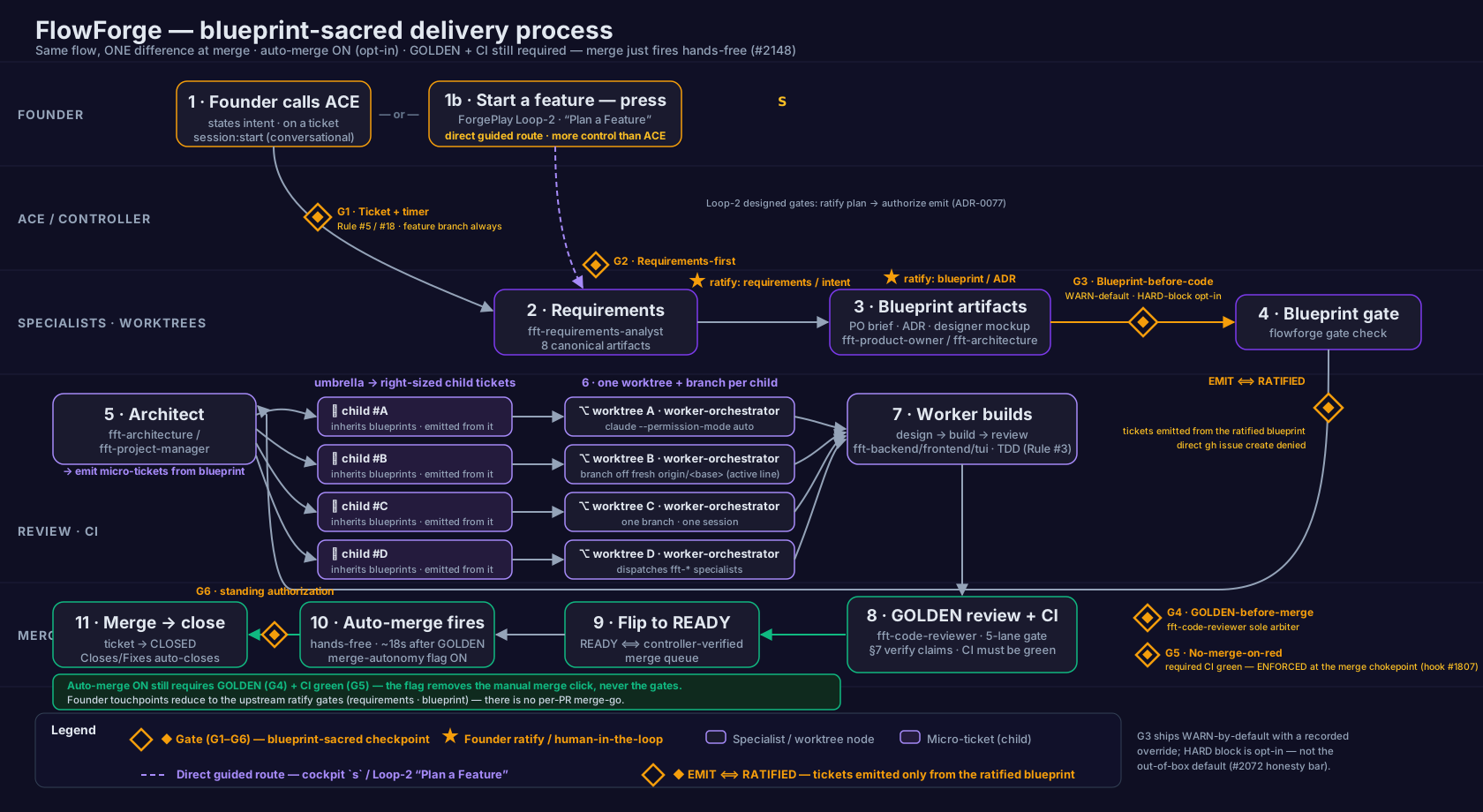
Edit this diagram in Excalidraw — the editable source for the auto-merge-ON variant.
What changes, and what does not:
- What changes — node 10 is no longer a founder click. With the flag on, once GOLDEN and green CI both hold, the merge fires hands-free (about eighteen seconds after GOLDEN). Gate G6 is no longer a per-pull-request merge-go; it is the standing authorization — the flag itself, granted once. Founder touchpoints therefore reduce to the two upstream ratify gates (requirements and blueprint).
- What does not change — the flag is consent to merge, never permission to skip the gates. GOLDEN (G4) and green, enforced CI (G5) are still required. Auto-merge only removes the manual merge click; it never merges un-reviewed or red work. The flag is off by default and is a deliberate, recorded choice to turn on.
This is why the two charts share one legend and one spine: the discipline is identical; only the last human touch is automated away, and only after the same gates have cleared.
This process chart was validated against lived FlowForge reality by the founder on 2026-07-09 and published with the corrections from that review applied. The node-by-node source anchoring lives in the repository at documentation/2.0/architecture/2148-blueprint-process-model.md.